MORE FROM YOUR XDJ-XZ

Stem control and custom screens for your XDJ-XZ.

Mute vocals, adjust drums and control stems from the touchscreen or your performance pads. Make the screen your own with twelve display styles.

Prepare stems with OverCue Desktop, then play them on your XZ. XZ Mods loads from USB without flashing the player's firmware.

XDJ-XZ firmware 1.26 · FAT32 USB · Windows for setup

  • Touch + padsstem control
  • 1 USBloader, music, stems
  • 3 stems+ Bypass per deck
  • 12display styles
XDJ-XZ · 800×480 screen capture · stem rows under both decks
The XDJ-XZ dual-deck screen with a row of Vocals, Harmonics, Drums and Bypass controls under each waveform. Deck 2 Harmonics is muted.

ON THE XDJ-XZ Vocals, Harmonics, Drums + Bypass on both decks.

HOW IT WORKS

Prepare. Plug in.
Play.

Set up your USB and stems on a computer, then control them on the XZ.

1

Prepare your USB

Open XZ Mods on Windows, click Choose USB and prepare loader, and select your FAT32 USB drive. The app downloads and verifies what it needs, then adds the loader to your stick.

Use your music USB or a separate loader stick. Preparing a new loader does not format the drive or overwrite your music or an existing loader. To update one, use Back up and update loader.

Using a separate loader stick?

You can remove it once the mod has loaded into memory. Keep the USB containing your music and stems connected while playing.

To return to stock, power off and restart without a USB containing the loader.

01 / LOADFrom your USB

The app adds autoexec.bin to your stick.

02 / PLAYRuns in memory

The XZ's internal firmware stays unchanged.

03 / RESETBack to stock

Power off and restart without the loader.
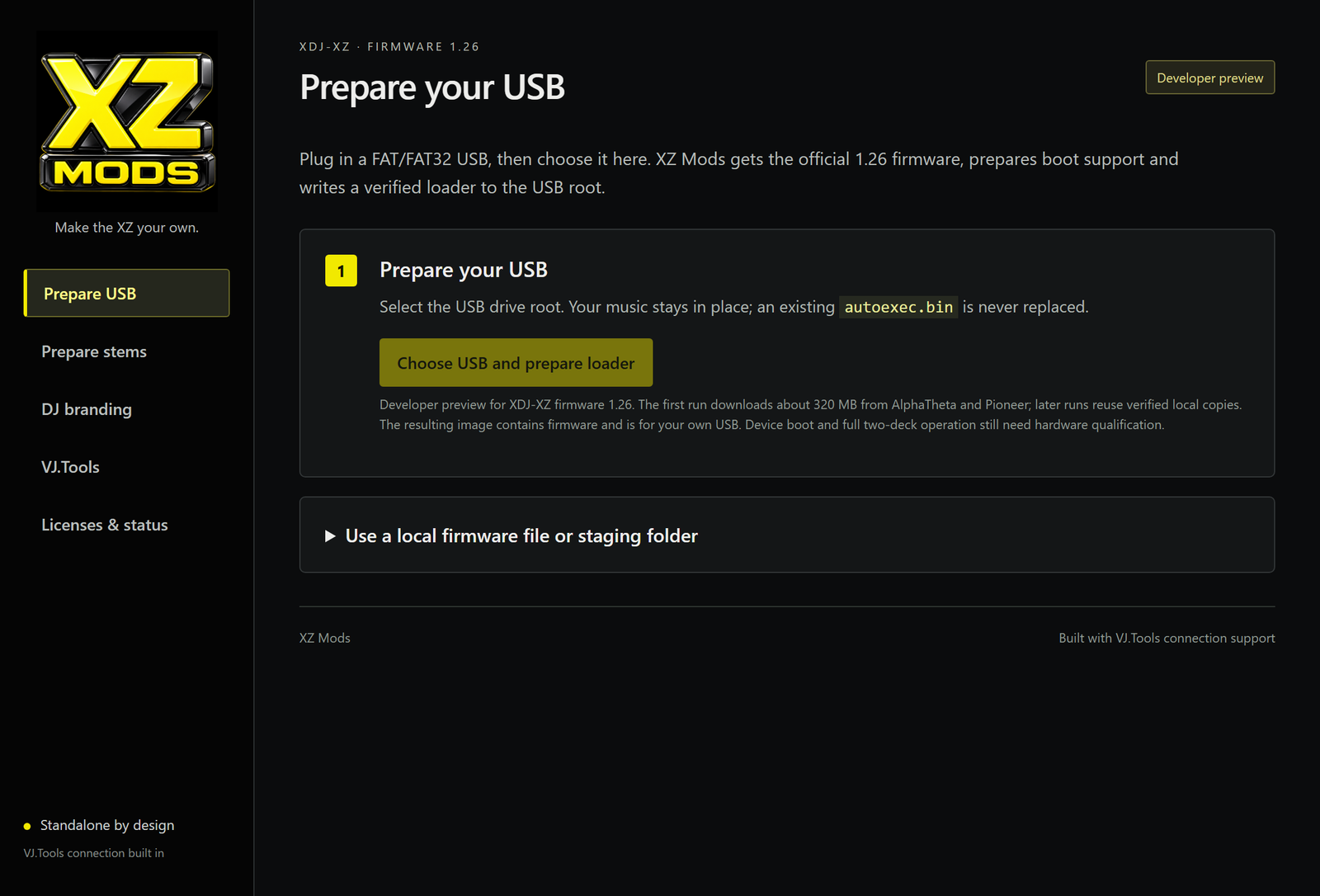
XZ Mods 0.1.5 · Prepare USB
The XZ Mods 0.1.5 builder on its Prepare USB page, with one button: Choose USB and prepare loader.
2

Prepare your stems

Use OverCue Desktop to separate tracks on your computer and save the stems alongside your rekordbox export.

XZ Mods reads those prepared stems directly from your music USB. Your music, stems and loader can all share one FAT32 stick.

Use OverCue Desktop only

Use OverCue's stem-preparation workflow. Its CDJ-3000 installer is not for the XDJ-XZ.

ON YOUR MUSIC USB

  • autoexec.binXZ Mods loader
  • Contents/your music · rekordbox export
  • PIONEER/rekordbox database
  • CDJMODS/written by OverCue Desktop
    • index.jsonwhich tracks have stems
    • stems/…overcue-stems/4 bundles
ONE USB / SIMPLEST SETUP

Everything on one stick.

Loader, music and prepared stems together.

Keep connected while playing
TWO USBs / ALSO WORKS

A separate loader.

One stick loads the mod. The other holds your music and stems.

Remove only the loader stick
3

Load a track and play

Insert your USB into the XZ and let the mod load. Choose the original track in the normal browser and wait for its stems to load. Each deck gets Vocals, Harmonics, Drums and Bypass controls beneath its waveform.

  • Tap a stem to mute it. Tap again to bring it back.
  • Drag left or right on a stem to set its level. Increasing a muted stem's level unmutes it.
  • Bypass returns that deck to the original mix.
  • STEMS, at the top of the screen, hides the rows without changing the audio or the pads.

Open MODS → Controls to assign the same four controls to physical buttons on each deck, such as the hot cue pads. Bank A–D is the default. The pads light green for Vocals, blue for Harmonics, red for Drums and white for Bypass, and dim when a stem is muted. The other bank keeps its normal hot cues.

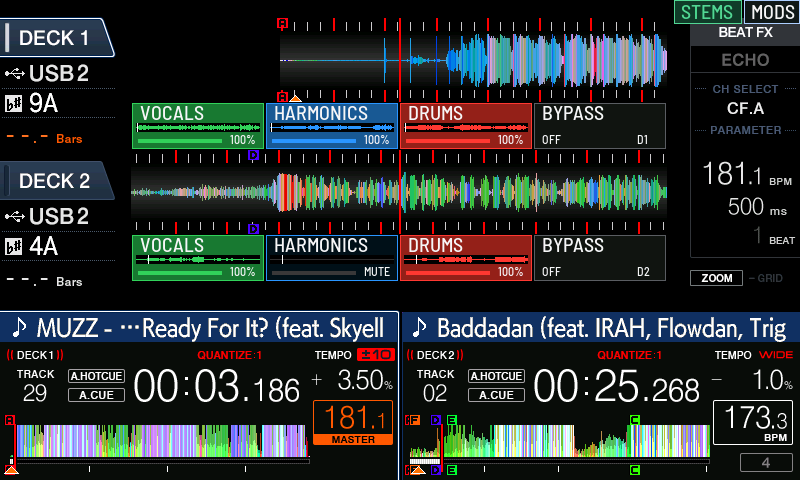
XDJ-XZ · 800×480 screen capture · two tracks loaded
The XDJ-XZ screen with stem rows under both decks. Callouts mark the STEMS button, the Vocals control, a level bar, a muted Harmonics stem on deck 2, and Bypass.
  • 1STEMS shows or hides the rows.
  • 2Tap a stem to mute it.
  • 3Drag across a stem to set its level.
  • 4Muted stems go dark. Deck 2 Harmonics here.
  • 5Bypass plays that deck's original mix.

FEATURE HIGHLIGHTS

More from your XZ.

Stem controls, screen styles and USB setup. See what's new in 0.1.9 ↗

XZ/01

Simple USB setup

Choose your FAT32 drive. The Windows app prepares the loader and keeps your music in place.

XZ/02

No firmware flashing

The mod runs in memory. Power off and restart without the loader to return to stock.

XZ/03

OverCue stems, read directly

Plays OverCue's prepared stems straight from the stick. Source and every audio page are checksum-verified.

XZ/04

Stem controls in the native layout

Vocals, Harmonics, Drums and Bypass under each deck's waveform. Tap to mute, drag to set the level, STEMS to hide the rows without changing the audio.

XZ/05

Assignable button controls

Map the same four controls to physical buttons on each deck, such as the hot cue pads on bank A–D. Green, blue, red and white LEDs, dimmed when muted. The other bank keeps its hot cues.

XZ/06

Twelve display styles

Applied to the native player, not just the mod's menu.

XZ/07

Check prepared stems

Use Check OverCue track in the app to verify a track's prepared stems before playing. The check leaves your files unchanged.

XZ/08

Advanced options

Build from a local official 1.26 ZIP or UPD, or into a staging folder you copy to a stick later.

XZ/09

Open source

MIT-licensed builder and mod code. Firmware and boot keys are never part of the download.

DISPLAY STYLES

Make the XZ
your own.

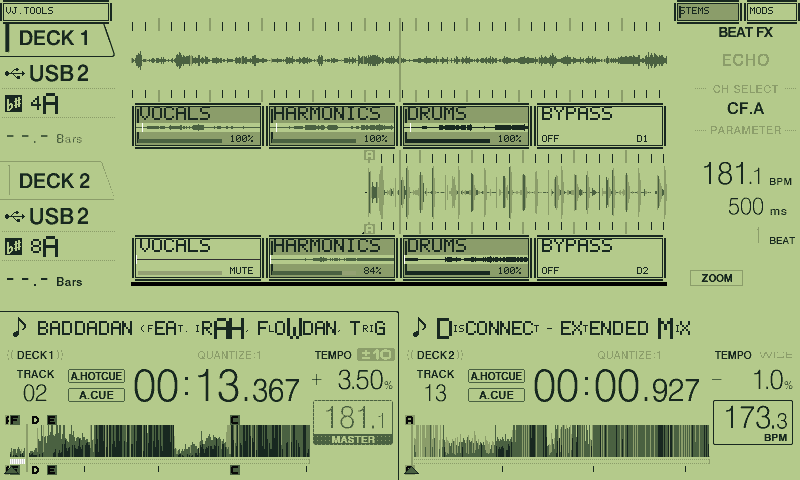
Choose from seven color styles and five retro-inspired designs in MODS → Appearance. Change the look of the player's artwork, text, waveforms, markers and dialogs.

XDJ-XZ · 800×480 screen capture · one of the retro styles
The XDJ-XZ screen in a green four-tone handheld style with a pixel font: two tracks loaded, stem rows under both decks, Deck 2 Vocals muted and Harmonics at 84 percent.

WHAT HAS BEEN TESTED

Testing notes.

XZ Mods is an experimental community project, tested on one XDJ-XZ. Here's what has been checked so far.

Confirmed on hardware

  • USB preparation with 0.1.5 and a cold boot of the XDJ-XZ with MODS running from that stick.
  • Split stem rows on both decks, clean audio and bright pads with the final green, blue, red and white colors, in RAM trials of the same runtime.

Checked in the Windows app

Official downloads, loader creation and image verification in the release build.

Still being tested

  • Long two-deck sets, loops recalled without preparation time, and deck focus changes.
  • Pad bank E–H. Bank A–D is the tested default.
  • Every screen in every display style. One retro style has a current capture.
  • Gate Cue, Smart Cue, Groove pads and X-PAD. They are visible under MODS → Advanced with readiness indicators and are not ready for a set.
  • The optional VJ.Tools connection. The receiver is included and has shown video on the XZ display in development, but sustained playback and touch have not been accepted. Its button appears only when the connection setting is on and a VJ.Tools link is live.

SPECS

What you need.

PlayerPioneer DJ XDJ-XZ on firmware 1.26. No other firmware version is supported.
Computer64-bit Windows with WebView2. Download and run XZ.Mods_0.1.9_x64-setup.exe, then open XZ Mods. A portable ZIP is also available. VJ.Tools and Python are not needed.
Existing USBAfter updating the Windows app, open USB loader → Back up and update loader to update an existing loader on your USB.
USBA FAT32 drive for your loader, music and stems. A separate loader-only stick also works. Keep your music USB connected while playing.
How it runsThe XZ picks up autoexec.bin from the stick and runs XZ Mods in RAM. The player's firmware is not flashed.
Back to stockPower off and start without the stick, or with a stick that has no autoexec.bin on it. Plug it in again to load the mod.
StemsOverCue overcue-stems/4 bundles via CDJMODS/index.json, 96 kHz stereo, source and page checksums verified.
ControlsVocals, Harmonics, Drums, Bypass per deck, in the native layout and assignable to physical buttons such as hot cue bank A–D (E–H optional, unverified).
StylesTwelve in total: seven color styles and five retro-inspired styles, chosen in MODS → Appearance.
Not includedFirmware, boot keys, boot images and the manufacturer's GUI files. The app downloads what it needs from the manufacturer and verifies it.
LicenseMIT for the builder and mod code, with third-party notices retained.

OTHER PLAYER MODS

Projects for
other players.

Independent projects by other developers. Follow each project's compatibility and installation guide.

OverCue ↗

CDJ-3000 · firmware 3.22

Stems, cue features and more for the CDJ-3000, plus OverCue Desktop, which prepares stems on your computer beside a rekordbox export. XZ Mods reads those prepared stems.

Install method: OverCue Desktop creates an installer or uninstaller USB for the CDJ-3000. That installer is not for the XZ. Check their site for what it writes to the player.

CDJ3K-Mods ↗

CDJ-3000 · firmware 3.13 to 3.22

Hot cues, stems, X-Pad, theming and browsing changes for the CDJ-3000.

Install method: installed on the player through its firmware-update path. Their README describes it as adding features without replacing the firmware.

XDJ-RX3 Toolkit ↗

XDJ-RX3 · firmware 1.19

Standalone stems and other modifications for the XDJ-RX3. This is the RX3, not the original XDJ-RX.

Install method: USB-loaded, like XZ Mods. Their README: no flashing, nothing written to the player's internal memory, pull the stick and the player is stock again.

XDJ-AZ Mods ↗

XDJ-AZ · firmware 1.30

A mod loader and desktop tooling for the XDJ-AZ.

Install method: writes to the firmware. Their README says the firmware is patched once to install a mod loader, after which mods load from USB, and that going back to stock means flashing the stock firmware.

Get XZ Mods
release updates.

An email when a new XZ Mods version is available.

No spam. Privacy

BEHIND XZ MODS

Built by
VJ OpticMystic.

I built XZ Mods to get more from my own XDJ-XZ. It's part of VJ.Tools, my collection of tools for DJs and visual artists.

I'm also exploring ways to bring live visuals to the XZ's screen. The development capture here shows video from VJ.Tools on the player. See the testing notes for the current state of video playback and touch control.

VJ OpticMystic · opticmystic.live ↗

Development capture · VJ.Tools video on the XZ display